What Makes a Great About Page for a Small Business
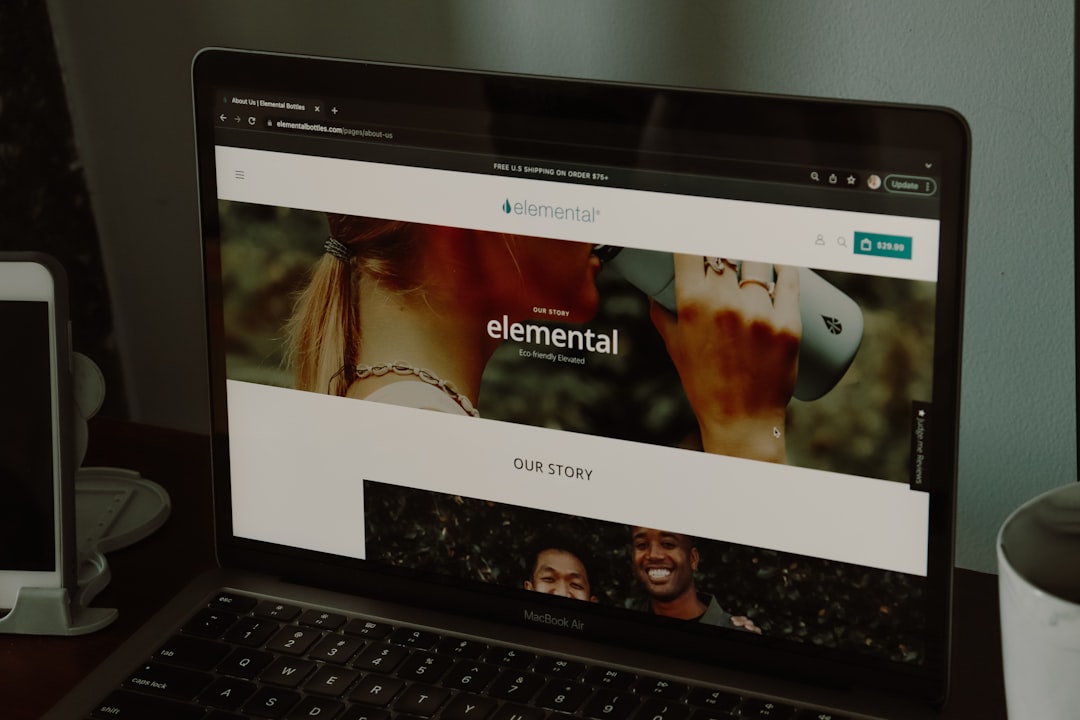
Your About page is one of the most visited pages on your entire website, yet many small business owners treat it as an afterthought. For NYC small businesses competing in a crowded marketplace, a well-crafted About page can be the difference between a visitor who becomes a loyal customer and one who clicks away to a competitor. Whether you run a boutique in SoHo, a restaurant in Brooklyn, or a professional services firm in Midtown Manhattan, your About page tells potential customers who you are, what you stand for, and why they should trust you with their business. In this guide, we will break down exactly what makes a great About page and how you can optimize yours to build credibility, connect with your audience, and drive more conversions for your small business. Why Your About Page Matters More Than You Think Many business owners pour all their energy into their homepage and service pages while neglecting the About page entirely. This is a significant mistake. Research from the Nielsen Norman Group consistently shows that the About page is among the top three most visited pages on any business website. Visitors navigate there because they want to understand who they are doing business with before making a purchasing decision. For small businesses in New York City, this matters even more. NYC consumers are savvy and have countless options at their fingertips. They want to know the story behind your brand, the people who run the company, and whether your values align with theirs. A generic or poorly written About page signals that you do not care about your brand presentation, which can erode trust before a customer even picks up the phone or sends an inquiry. Your About page also plays an important role in your overall search engine optimization strategy. Google evaluates expertise, authoritativeness, and trustworthiness when ranking websites. A detailed About page that clearly communicates your qualifications, experience, and business story contributes to these trust signals and can help improve your site’s visibility in local search results. Start With a Compelling Brand Story Lead With Your Why The most effective About pages do not start with a dry list of services or a bland corporate mission statement. Instead, they lead with the reason the business exists in the first place. Think about what motivated you to start your business, what problem you set out to solve, and what drives you to show up every day. Customers connect with stories far more than they connect with sales pitches, and a genuine narrative about your origins can create an emotional bond that sets you apart from competitors. Make It Personal and Authentic Small businesses have a natural advantage over large corporations when it comes to storytelling. You can share genuine, personal details about your journey that a Fortune 500 company simply cannot replicate. Talk about the challenges you overcame when starting your business in Manhattan, the neighborhood that shaped your vision, or the moment you realized there was a gap in the market you could fill. Authenticity resonates with readers, and according to research published by NNGroup on trust signals, visitors can quickly detect when content feels forced or insincere. Keep It Focused on the Customer While your About page should tell your story, it should ultimately connect back to your customer. Frame your narrative in a way that shows how your journey and experience directly benefit the people you serve. Instead of saying you have twenty years of experience, explain what those twenty years mean for the quality of service your customers receive. This subtle shift transforms your About page from a self-congratulatory biography into a persuasive piece of content that speaks directly to your target audience’s needs and concerns. Essential Elements Every Great About Page Needs Professional Photos of Your Team One of the most overlooked elements of an effective About page is high-quality photography. Stock photos and generic images undermine credibility because visitors can tell they are not real representations of your business. Invest in professional headshots of your team members and candid photos of your workspace or team in action. For NYC businesses, consider including photos that showcase your local environment, whether that is your storefront on a bustling Manhattan street or your team collaborating in a Brooklyn office space. According to web.dev guidelines on image performance, make sure your images are properly optimized so they do not slow down your page loading speed. Clear Value Proposition Your About page should clearly communicate what makes your business different from every other company offering similar products or services. This is your value proposition, and it should be evident within the first few sentences. Are you the only bakery in Queens that uses exclusively organic ingredients? Do you offer same-day service that no other plumber in Manhattan can match? Whatever makes you unique, make sure it is front and center on your About page so visitors understand immediately why they should choose you. Credentials, Awards, and Social Proof Trust is everything for a small business, and your About page is the perfect place to showcase the evidence that backs up your claims. Include relevant certifications, professional memberships, industry awards, and notable press mentions. If you have been featured in local NYC publications or recognized by industry organizations, display those logos and links prominently. Customer testimonials and case study highlights also belong on your About page, as they provide third-party validation that reinforces your expertise and reliability. A Clear Call to Action Every page on your website should guide the visitor toward a next step, and your About page is no exception. After reading your story and learning about your team, the visitor should know exactly what to do next. Whether it is scheduling a consultation, requesting a quote, or simply getting in touch, include a prominent and specific call to action that makes it easy for the reader to take that next step. A well-placed CTA button can significantly increase conversion rates on your About page. Common