irwin Litvak

Author: irwin Litvak
Page 10
Performance Max Google Ads campaign for NYC small businesses — IL WebDesign Manhattan

What Is Performance Max in Google Ads and Should Your NYC Business Use It?

Irwin Litvak|April 17, 2026|9 min readGoogle Ads Table of Contents What Is Performance Max? How Performance Max Works Benefits of Performance Max for NYC Businesses Drawbacks and Limitations to Know Should Your NYC Business Use Performance Max? Key Takeaways Google Ads is constantly evolving, and one of the most significant changes in recent years is the introduction of Performance Max campaigns. If you’ve been running Google Ads for your NYC small business, you’ve probably seen this campaign type appearing in your dashboard or heard about it from your marketing agency. Performance Max — often called PMax — promises to simplify campaign management and maximize results across all of Google’s advertising channels from a single campaign. But is it right for your Manhattan, Brooklyn, or Queens business? In this guide, we’ll break down exactly what Performance Max is, how it works, and whether it should be part of your Google Ads strategy. What Is Performance Max? Performance Max is a goal-based Google Ads campaign type that allows advertisers to access all of Google’s ad inventory from a single campaign. According to Google Ads Help, Performance Max is designed to complement your keyword-based Search campaigns by helping you find more converting customers across all of Google’s channels — including Search, Display, YouTube, Gmail, Discover, and Maps. Unlike traditional campaign types where you choose specific networks (Search, Display, Shopping, etc.), Performance Max uses Google’s AI and machine learning to automatically determine where, when, and how to serve your ads across all these channels simultaneously. You provide assets — headlines, descriptions, images, and videos — and Google’s algorithm assembles them into ads and optimizes delivery in real time. The Shift From Manual to AI-Driven Advertising Performance Max represents Google’s broader push toward automation in advertising. It follows the same philosophy as Smart Bidding, responsive ads, and broad match keywords — removing manual controls in favor of algorithm-driven optimization. For many NYC businesses that previously ran separate Search, Display, and Shopping campaigns, PMax consolidates this into one streamlined workflow. This shift has significant implications for how you manage and measure your ad performance, which we’ll cover in detail throughout this guide. How Performance Max Works Understanding how Performance Max functions under the hood is essential for using it effectively for your NYC business. Asset Groups The foundation of a Performance Max campaign is the Asset Group — a collection of creative assets (headlines, descriptions, images, logos, videos) grouped around a specific theme or audience. Google uses these assets to automatically create ads in multiple formats across all its channels. You can have multiple asset groups within a single campaign, each targeting different products, services, or audience segments. For NYC service businesses, you might create separate asset groups for different services (e.g., web design vs. SEO vs. Google Ads management). Audience Signals While Performance Max automates placement decisions, you can provide “audience signals” — data about your ideal customers — to help guide Google’s algorithm in the right direction. Audience signals can include customer lists, website visitors, interest categories, and in-market segments. Providing strong audience signals is one of the most important things you can do to improve PMax performance, especially in a competitive local market like New York City. Without signals, the algorithm takes longer to learn and may waste budget on irrelevant audiences. Conversion Goals Performance Max campaigns are goal-based, meaning the algorithm optimizes entirely toward your defined conversion actions — phone calls, form submissions, purchases, etc. This is why having accurate conversion tracking set up is critical before launching PMax. Poor or incomplete conversion tracking will cause the algorithm to optimize toward the wrong actions, wasting your ad budget. As we explain in our guide on Google Ads conversions and tracking, getting this foundation right is non-negotiable for any campaign type, but especially for automated campaigns like PMax. Benefits of Performance Max for NYC Businesses Performance Max offers several genuine advantages for small businesses in New York City competing in a dense advertising market. Broad Channel Coverage New York City consumers interact with Google’s ecosystem across multiple touchpoints throughout their day. They search on Google, watch videos on YouTube during their commute, browse Gmail, and scroll through the Discover feed. Performance Max allows your business to appear across all these surfaces simultaneously — something that previously required managing multiple separate campaigns. For a small business with limited time to manage advertising, this consolidated approach is a significant efficiency gain. Simplified Campaign Management Traditional Google Ads campaigns require ongoing bid adjustments, keyword refinements, ad schedule management, and audience exclusions. Performance Max automates many of these decisions, freeing up time to focus on the creative assets and business strategy. This is particularly beneficial for small business owners who handle their own marketing or work with a lean team. Combined with Smart Bidding strategies like Target CPA or Target ROAS, PMax can deliver strong results with less ongoing maintenance than traditional campaigns. Access to New Audiences According to Think with Google, Performance Max campaigns consistently find new customer segments that keyword-based Search campaigns miss. By running across YouTube, Display, and Discover, PMax can reach potential customers who are in an earlier stage of the buying journey — before they start actively searching. For NYC businesses in competitive industries like legal services, home improvement, or medical practices, reaching audiences earlier in their research process can be a significant competitive advantage. Google Maps Integration For NYC businesses with a physical location, Performance Max integrates with Google Business Profile to serve Local ads on Google Maps. This means potential customers searching for services near them can see your business featured directly in the Maps interface. Given that local searches drive enormous foot traffic in New York City’s dense neighborhoods, this Maps integration alone can make Performance Max valuable for retail businesses, restaurants, medical offices, and other location-dependent businesses. Drawbacks and Limitations to Know Performance Max is not a magic solution, and there are important limitations NYC businesses should understand before committing to it. Limited Transparency One of the
Google Search Console SEO analytics for NYC small businesses — IL WebDesign Manhattan

How to Use Google Search Console to Improve Your SEO

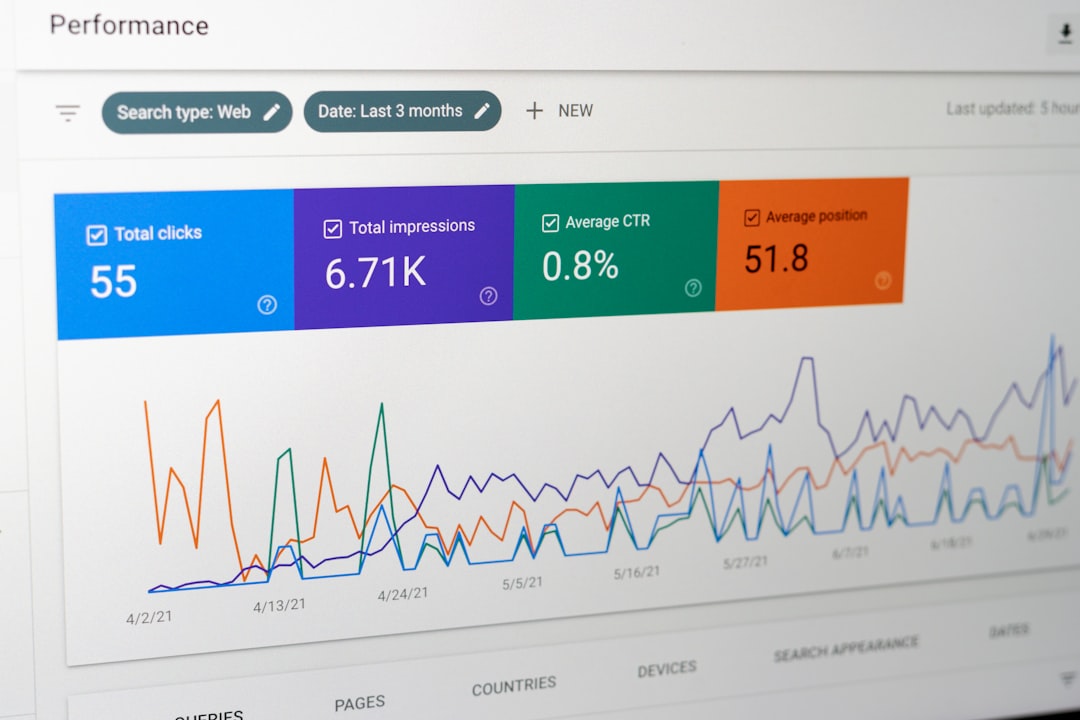
Irwin Litvak|April 17, 2026|9 min readSEO Table of Contents What Is Google Search Console? How to Set Up Google Search Console Key Reports Every NYC Business Should Use Using GSC to Fix SEO Issues How to Improve Rankings With GSC Data Key Takeaways If you’re running a small business in New York City, you’re already familiar with the challenge of standing out online. Search engine optimization is one of the most powerful ways to attract local customers — but how do you know if your SEO is actually working? Google Search Console is a free tool from Google that gives you direct insight into how your website performs in search results. It shows you which keywords bring visitors to your site, what errors Google encounters when crawling your pages, and which pages have room to climb higher in the rankings. In this guide, we’ll walk through exactly how to use Google Search Console to improve your SEO and grow your NYC business’s online visibility. What Is Google Search Console? Google Search Console (GSC) is a free web service provided by Google that helps website owners monitor, maintain, and troubleshoot their site’s presence in Google Search results. Unlike Google Analytics, which shows you what users do on your site, Google Search Console shows you how Google sees and indexes your site. According to Google Search Central, Search Console provides tools and reports to help you understand and improve your site’s performance in Google Search. The platform is completely free to use and is essential for any serious SEO effort. Many NYC business owners overlook this tool, which puts them at a significant disadvantage compared to competitors who use it regularly. GSC vs. Google Analytics: What’s the Difference? Google Analytics tracks user behavior on your website — where they came from, how long they stayed, what pages they viewed. Google Search Console tells you about your site’s performance in search specifically — what queries triggered your pages, your click-through rates, and whether Google can properly crawl and index your content. Both tools are valuable and complementary. As we cover in our guide on page speed and SEO, technical performance factors that appear in GSC directly impact your search rankings. How to Set Up Google Search Console Getting started with Google Search Console takes just a few minutes. Here’s how to set it up for your NYC business website. Step 1: Add Your Property Go to search.google.com/search-console and sign in with your Google account. Click “Add Property” and enter your website’s URL. You’ll have two options: Domain property (covers all versions of your URL) or URL Prefix property (for a specific URL like https://yoursite.com). For most NYC small businesses, the Domain property is recommended for the most comprehensive data. Step 2: Verify Ownership Google needs to verify that you own the website before granting access. The easiest method is to add an HTML tag to your website’s <head> section, or use Google Analytics (if already installed). For WordPress sites with a plugin like Rank Math or Yoast, there’s usually a built-in GSC verification field that makes this one-click easy. Step 3: Submit Your Sitemap Once verified, submit your XML sitemap by navigating to Sitemaps in the left sidebar and entering your sitemap URL (typically yoursite.com/sitemap.xml). This helps Google discover and index all your pages faster. If you’re not sure whether your site has an XML sitemap, review our guide on what an XML sitemap is and why you need one. Key Reports Every NYC Business Should Use Google Search Console is packed with data, but these are the reports that matter most for improving your SEO performance as a New York City small business. 1. Performance Report The Performance report is where you’ll spend most of your time. It shows you: total clicks (how many people clicked through to your site from Google), total impressions (how many times your site appeared in search results), average click-through rate (CTR), and average position. Filter this data by page, query, country, or device to identify patterns. For NYC businesses, filtering by device often reveals surprising differences between desktop and mobile performance — Google uses mobile-first indexing, so mobile performance is critical. 2. URL Inspection Tool The URL Inspection tool lets you check how Google sees any specific page on your site. Enter any URL from your domain and Google will tell you whether it’s indexed, when it was last crawled, any indexing issues, and a preview of how the page renders. This is particularly useful when you’ve updated a page and want to ensure Google picks up the changes quickly. 3. Coverage Report The Coverage (Indexing) report shows which pages on your site Google has indexed and which ones have errors, warnings, or are excluded. Common issues include pages blocked by robots.txt, pages returning 404 errors, or pages with redirect chains. Fixing coverage errors ensures that all your valuable content is actually visible in Google search. As we explain in our guide on robots.txt files, small configuration mistakes can accidentally block important pages from Google. 4. Core Web Vitals Report Google Search Console now includes a Core Web Vitals report that measures user experience metrics like Largest Contentful Paint (LCP), Cumulative Layout Shift (CLS), and Interaction to Next Paint (INP). These metrics directly impact your Google rankings. Pages in the “Poor” or “Needs Improvement” categories should be prioritized for optimization. Using GSC to Fix SEO Issues Google Search Console isn’t just for reporting — it’s a diagnostic tool that helps you identify and fix problems holding back your SEO. Here’s how to use it proactively. Find and Fix Crawl Errors Navigate to Pages → Not Indexed and look for pages with errors. Common fixable issues include: “Submitted URL returned 404” (broken links or deleted pages), “Page with redirect” (pages that should be updated), and “Duplicate without user-selected canonical” (duplicate content issues). Each error type has a clear fix — 404 errors should either be restored or redirected to a relevant existing page. Request Indexing for
UX design process for NYC small businesses — IL WebDesign Manhattan

What Is UX Design and Why Does It Matter for Your Business Website?

Irwin Litvak|April 17, 2026|9 min readWebsite Design Table of Contents What Is UX Design? Key Principles of UX Design for Business Websites Why UX Design Matters for Your NYC Business Common UX Mistakes Small Businesses Make How to Improve Your Website’s UX Key Takeaways Your website might look beautiful, but if visitors can’t figure out how to use it, you’re losing customers. That’s where UX design — user experience design — comes in. For NYC small businesses competing in one of the world’s most demanding markets, a website that’s frustrating or confusing can mean the difference between a new client and a lost sale. UX design isn’t just a buzzword for tech companies; it’s a fundamental part of building a business website that actually converts visitors into paying customers. In this guide, we’ll break down exactly what UX design is, why it matters for your Manhattan or Brooklyn business, and how you can start improving it today. What Is UX Design? UX design, short for user experience design, is the process of creating websites and digital products that are easy, efficient, and enjoyable to use. It encompasses everything a visitor encounters when they land on your site — from the layout and navigation to the speed at which pages load and the clarity of your calls to action. According to the Nielsen Norman Group, user experience includes all aspects of the end-user’s interaction with a company, its services, and its products. In the context of a business website, this means your UX design should make it effortless for a potential customer to find the information they need, trust your brand, and take action — whether that’s calling your office, filling out a form, or making a purchase. UX design is distinct from UI (user interface) design, though the two are often confused. UI design is about the visual elements — colors, fonts, buttons, and icons. UX design is about the overall experience and flow. A website can have stunning UI design but poor UX if users can’t easily navigate it. The most effective business websites nail both. UX Design vs. Web Design: What’s the Difference? Traditional web design focuses heavily on aesthetics and technical implementation. UX design adds a layer of strategy by centering every decision on the end user’s needs and behavior. At IL WebDesign, we integrate UX principles into every website we build because a great-looking site that frustrates users simply doesn’t perform. Key Principles of UX Design for Business Websites Great UX design is built on a set of core principles that guide every decision — from the placement of your navigation menu to the wording on your contact button. Here are the most important ones to understand for your NYC business website. 1. Clarity Over Cleverness Users don’t want to think hard on your website. Research by the Nielsen Norman Group consistently shows that visitors scan web pages rather than read them word for word. Clear, direct language and obvious navigation paths outperform creative or clever designs that require interpretation. Your menu items should say exactly what they are: “Services,” “About,” “Contact” — not “What We Do,” “Our Story,” “Let’s Connect.” 2. Consistent Visual Hierarchy Visual hierarchy guides the eye from the most important elements to the least important. Headlines should be larger than body text. CTAs should stand out through color or size. The most critical information — your value proposition and primary action — should appear above the fold. This is directly connected to mobile-first design, where the limited screen real estate makes hierarchy even more critical. 3. Fast Load Times Speed is a UX issue, not just a technical one. According to Google’s Core Web Vitals, a page that takes more than 3 seconds to load loses a significant percentage of visitors. For NYC business owners, that means lost revenue. Every second of delay in page load time reduces conversions — which is why performance optimization is built into every website we design. 4. Accessibility Good UX design is inclusive. The Web Content Accessibility Guidelines (WCAG) from the W3C provide standards for making websites usable by people with disabilities — including those with visual, auditory, or cognitive impairments. Beyond being the right thing to do, accessibility also improves SEO and protects your business from ADA compliance issues. Why UX Design Matters for Your NYC Business New York City’s business landscape is fiercely competitive. Whether you run a law firm in Midtown, a restaurant in Brooklyn, or a boutique in the West Village, your website is often the first impression you make. Poor UX design directly impacts your bottom line in several measurable ways. Higher Bounce Rates When visitors land on a confusing or slow website, they leave — often within seconds. This is called a bounce. High bounce rates signal to Google that your site isn’t meeting user expectations, which can hurt your search rankings over time. Good UX design keeps visitors engaged and exploring, lowering your bounce rate and improving your SEO performance. Lower Conversion Rates Every point of friction in your user’s journey — a hard-to-find phone number, a contact form with too many fields, a checkout process with too many steps — reduces the likelihood that a visitor becomes a customer. UX design systematically identifies and removes these friction points. As we discussed in our guide on building trust with your website design, trust signals and ease of use go hand-in-hand when it comes to converting visitors. Brand Perception A poorly designed website makes your business look unprofessional, even if your actual services are top-notch. In competitive NYC markets, first impressions are everything. A polished, intuitive website communicates competence and credibility before a visitor reads a single word of your copy. This is especially important for professional service businesses like accountants, attorneys, and consultants. Common UX Mistakes Small Businesses Make Even well-intentioned business owners make UX mistakes that silently cost them customers every day. Here are the most common ones we see on NYC small business websites. Cluttered Navigation
Google Local Services Ads for NYC small businesses — IL WebDesign Manhattan

What Is Google Local Services Ads and How Does It Work for NYC Businesses?

Irwin Litvak|April 16, 2026|9 min readGOOGLE ADS ☰In This Article What Are Google Local Services Ads? How Google Local Services Ads Work Google Local Services Ads vs. Standard Google Ads Is Your NYC Business Eligible for LSAs? How to Set Up Google Local Services Ads Tips to Maximize Your LSA Performance Key Takeaways If you run a service-based business in New York City — a plumbing company, a law firm, a cleaning service, a home improvement contractor — you’ve probably noticed that the very top of Google’s search results looks different than it used to. Above the traditional paid ads and even above the local map pack, there’s often a row of green checkmarked cards with business names, star ratings, and phone numbers. These are Google Local Services Ads (LSAs), and for NYC small businesses in eligible categories, they represent one of the most cost-effective digital advertising formats available. In this guide, we break down exactly what LSAs are, how they work, who qualifies, and how to make the most of them. What Are Google Local Services Ads? Google Local Services Ads (LSAs) are a specialized ad format designed specifically for local service businesses. Unlike standard Google Ads, which charge per click (PPC), LSAs operate on a pay-per-lead model — you only pay when a potential customer contacts you directly through the ad by calling, messaging, or booking an appointment. Each LSA displays your business name, star rating, number of reviews, years in business, hours, and the green “Google Guaranteed” or “Google Screened” badge — a verification mark that signals to searchers that Google has vetted your business. The Google Guarantee Badge: What It Means The “Google Guaranteed” badge is the hallmark of LSAs for home service businesses. To earn it, your business must pass Google’s background check process — which includes license verification, insurance confirmation, and identity verification for business owners and key employees. If a customer is dissatisfied with a service booked through a Google Guaranteed LSA, Google may refund the cost of the job up to a lifetime cap per customer — currently $2,000 in the US. This guarantee doesn’t apply to the business’s quality of work in general, but it’s a powerful trust signal that makes searchers significantly more likely to click and call. Google Screened vs. Google Guaranteed Not all LSA businesses get the “Guaranteed” badge. Professional service businesses — lawyers, financial advisors, real estate agents, tax specialists — receive a “Google Screened” badge instead. The screening process is similar (license and insurance verification) but the financial guarantee doesn’t apply. Both badges serve the same fundamental purpose: giving searchers confidence that Google has verified the business’s credentials. How Google Local Services Ads Work Understanding the mechanics of LSAs helps you set realistic expectations and optimize your performance. Here’s how the system operates from search to payment. Pay-Per-Lead Pricing The most important distinction between LSAs and standard Google Ads is the pricing model. With traditional PPC campaigns (which we cover in our guide to structuring Google Ads campaigns), you pay every time someone clicks your ad — whether or not they contact you. With LSAs, you only pay when someone reaches out to your business directly through the ad: a phone call, a message, or a booking. Google charges a fixed cost-per-lead that varies by industry and market. In NYC, lead costs typically range from $15–$150+ depending on the service category, with legal and financial services at the higher end and cleaning or home repair at the lower end. How LSA Rankings Are Determined According to Google’s LSA documentation, ad rankings are based on a combination of factors including proximity to the searcher, review score and volume, responsiveness (how quickly you respond to leads), business hours, and budget availability. Unlike standard Google Ads, LSA ranking does not depend on bidding strategy or Quality Score in the traditional sense — your reputation and responsiveness matter more than your ad spend. Disputing Invalid Leads One of the most underused features of LSAs is the ability to dispute invalid leads. If you receive a call from someone outside your service area, asking for a service you don’t offer, or a clear spam call, you can dispute the charge within 30 days. Google reviews disputes and will credit your account for leads that don’t meet their validity criteria. For NYC businesses with tight margins, consistently disputing invalid leads can meaningfully reduce your effective cost per lead. Google Local Services Ads vs. Standard Google Ads Many NYC businesses use both LSAs and standard Google Ads, but understanding the differences helps you allocate budget strategically. Key Differences at a Glance Standard Google Ads give you extensive control — over keywords, ad copy, landing pages, bidding strategies, and audience targeting. You can direct traffic to specific pages on your website, run remarketing campaigns, and segment campaigns by location down to the zip code. LSAs, by contrast, are much simpler. You don’t write ad copy, choose keywords, or manage bids in the traditional sense. The ad is generated automatically from your business profile, and Google determines when to show it based on your verified information and performance signals. The tradeoff is simplicity vs. control. For businesses that want high-intent local leads with minimal campaign management overhead, LSAs are often the better starting point. For businesses that want to promote specific services, run seasonal campaigns, or target specific audience segments, standard Google Ads (and understanding concepts like Quality Score and Ad Rank) are essential. Position on the Search Results Page LSAs appear at the very top of the search results page — above standard paid search ads and above the organic “Local Pack” (the map section). This premium placement means even a single LSA listing can dominate the most valuable real estate in local search. For NYC businesses in competitive categories like legal services, home repair, or health and wellness, this visibility advantage is substantial. Is Your NYC Business Eligible for LSAs? Google Local Services Ads are currently available for a specific set of
Bounce rate SEO analytics for NYC small businesses — IL WebDesign Manhattan

What Is Bounce Rate and How Does It Affect Your SEO?

Irwin Litvak|April 16, 2026|9 min readSEO ☰In This Article What Is Bounce Rate? What Is a Good vs. Bad Bounce Rate? Does Bounce Rate Affect SEO Rankings? Common Causes of a High Bounce Rate How to Reduce Your Bounce Rate How to Measure and Track Your Bounce Rate Key Takeaways You’ve invested in a website for your NYC small business. Your Google Analytics dashboard is running. Traffic is coming in. But then you notice a number that gives you pause — your bounce rate is 75%, 80%, or even higher. Should you be worried? Is it hurting your Google rankings? And what can you realistically do about it? Bounce rate is one of the most misunderstood metrics in digital marketing. This guide breaks down exactly what bounce rate is, how it relates to your SEO performance, and the concrete steps NYC small business owners can take to improve it. What Is Bounce Rate? Bounce rate is the percentage of website visitors who land on a page and then leave without clicking to any other page on the same site. In other words, they visited one page, didn’t explore further, and left — whether after 10 seconds or 10 minutes. In Google Analytics 4 (GA4) — the current standard — the metric has been slightly redefined. GA4 uses “engagement rate” as its primary metric, with bounce rate defined as the percentage of sessions that are not engaged. A session is considered “engaged” if the visitor stays for at least 10 seconds, views at least two pages, or triggers a conversion event. This makes the GA4 bounce rate meaningfully different from the Universal Analytics version, where any single-page session counted as a bounce regardless of time spent. Bounce Rate vs. Exit Rate: What’s the Difference? These two metrics are often confused. Exit rate measures how often a specific page is the last page someone views before leaving the site — but it counts users who visited other pages first. Bounce rate specifically measures single-page sessions where no further interaction occurred. A high exit rate on a contact confirmation page (after someone submits a form) is perfectly normal and expected. A high bounce rate on a service page typically signals a problem worth investigating. What Is a Good vs. Bad Bounce Rate? There is no single “correct” bounce rate — context matters enormously. According to data from Think With Google, bounce rates vary widely by industry, page type, and traffic source. General Benchmarks by Page Type Landing pages and paid ad destinations tend to have higher bounce rates (60–90%) because visitors often arrive with a specific intent — read the offer, decide yes or no, and leave. Blog posts also typically have higher bounce rates (65–90%) because readers often come from search, read the article, and return to Google without clicking elsewhere. E-commerce product pages and service pages generally should aim for lower bounce rates (20–45%) since engaged buyers explore multiple pages before converting. Contact pages and confirmation pages often have high bounce rates that are completely intentional — someone submitted a form, saw the thank-you message, and left. What High Bounce Rate Actually Signals A high bounce rate on a key service or homepage is worth investigating — it often indicates that visitors aren’t finding what they expected, the page loads too slowly, the design doesn’t build trust quickly, or the call-to-action isn’t clear. For NYC businesses where competition is fierce and ad costs are high, every visitor who bounces represents real money lost. Does Bounce Rate Affect SEO Rankings? This is the question every business owner asks — and the answer is nuanced. Google has officially stated that bounce rate from Google Analytics is not a direct ranking signal. Google does not have access to your GA4 data, and using it as a ranking factor would be unreliable since it can be easily manipulated. Pogo-Sticking: The Indirect SEO Connection However, bounce rate is correlated with a behavior that Google does measure: pogo-sticking. This occurs when a user clicks your result in Google’s search results, immediately returns to the results page, and clicks a competitor’s result instead. This pattern sends a clear negative signal to Google — your page didn’t satisfy the search intent. While Google hasn’t confirmed a direct penalty for pogo-sticking, the Search Quality Evaluator Guidelines emphasize user satisfaction as a core quality signal. The practical conclusion: a high bounce rate combined with short time-on-page suggests your content isn’t meeting user expectations — which indirectly hurts your ability to maintain and improve rankings. If you’re working to improve your overall Core Web Vitals, addressing bounce rate issues often goes hand in hand since speed, stability, and user experience improvements benefit both metrics simultaneously. Engagement Signals Google Does Use Google’s ranking systems incorporate user satisfaction signals through mechanisms like click-through rate, dwell time, and the overall quality of the browsing experience. While bounce rate itself isn’t in the equation, the underlying problems that cause high bounce rates — slow load times, poor content quality, mismatched search intent — absolutely affect your rankings. Addressing bounce rate issues almost always means improving the same factors that Google’s algorithms reward. Common Causes of a High Bounce Rate Before you can fix a high bounce rate, you need to understand what’s causing it. For NYC small business websites, the most common culprits fall into a few clear categories. 1. Slow Page Load Speed According to web.dev, pages that take more than 3 seconds to load see dramatically higher abandonment rates. In a city where everyone is moving fast and often on mobile, a slow website is an empty storefront. Learn more about the impact of speed in our detailed guide on page speed and SEO rankings. 2. Mismatched Search Intent If someone searches “best divorce lawyer Manhattan” and lands on a generic homepage about your law firm, they’ll likely leave immediately. Your page content needs to precisely match what the visitor expected to find based on the link or ad they clicked. This is

IL Webdesign is a dynamic digital agency specializing in creating bespoke websites, strategic SEO, and impactful social media marketing to propel businesses forward in the digital landscape.

Contact Us