
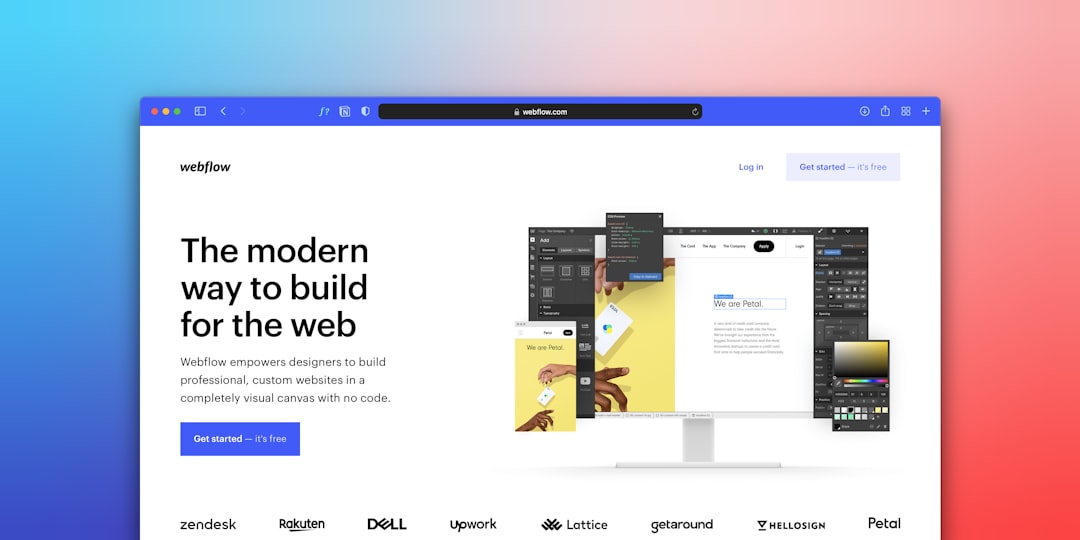
Homepage design for NYC small businesses is more than aesthetics — it is strategy. Competing in one of the world’s most crowded markets, whether you’re in Manhattan, Brooklyn, or Queens, your homepage has just seconds to capture a visitor’s attention and convince them to stay. Research from the Nielsen Norman Group shows that users form an opinion about a website in as little as 0.05 seconds. A well-designed homepage communicates who you are, what you offer, and why visitors should choose you over the competition. In this guide, we walk you through the essential elements of a high-converting homepage design for NYC small businesses so your site turns more visitors into paying customers.
Start Your Homepage Design With a Clear Hero Section
The first thing visitors see when they land on your website is the hero section — the large banner area at the top of your homepage. This is your most valuable digital real estate, and it needs to do three things immediately: communicate what you do, who you serve, and what action you want visitors to take.
Write a Headline That Speaks Directly to Your Audience
A strong headline is essential. It should clearly state your value proposition in 6–12 words. For example: “Professional Web Design for NYC Small Businesses” — clear, direct, and location-specific. Pair it with a subheadline that elaborates on your main offer and addresses a key pain point your customers have. Vague headlines like “Welcome to Our Website” or “Your Trusted Partner” say nothing specific and drive visitors away immediately.
Make Your CTA Button Unmissable
Every effective hero section includes a prominent call-to-action (CTA) button with action-oriented language: “Get a Free Quote,” “Schedule a Consultation,” or “See Our Work.” The button color should contrast sharply with the background so it’s impossible to miss. Support your headline with a high-quality image or video that reflects your brand — for NYC businesses, imagery connected to the city or showing real customers builds instant trust and local relevance.
Homepage Design: Showcase Your Services Clearly
After the hero section, visitors want to quickly understand what you offer. A dedicated “Services” or “What We Do” section should appear near the top of the page, immediately following the hero. Structure this section with clean, scannable cards or columns — one for each key service — including a short 2–3 sentence description and a “Learn More” link to a dedicated service page.
Keep Your Services Focused
Resist the temptation to list every service you offer. Instead, highlight your 3–6 core services. Too many options overwhelm visitors and can actually reduce conversions — a phenomenon known as the paradox of choice. Pair each service with a relevant icon or small illustration; visual cues help visitors process information faster and make your services section feel professional and polished.
Add Location-Specific Context
For NYC businesses, it helps to call out any location-specific specializations. If you exclusively serve Manhattan businesses, say so. If you work across all five boroughs, mention that. Local specificity builds trust and signals relevance to local searchers. This also improves your internal linking structure when you link to individual service pages, which benefits your overall SEO.
Homepage Design That Builds Credibility With Social Proof
One of the most powerful drivers of conversion on any homepage is social proof — testimonials, reviews, case studies, and client logos that demonstrate you’ve delivered results for others. New York City consumers are sophisticated and skeptical. They’ve seen countless service providers promise the world and deliver little. Authentic social proof lets your happy clients do the convincing for you.
Types of Social Proof That Convert
Client testimonials are the most direct form of social proof. Feature 2–4 quotes from satisfied customers with their name, business, and ideally a photo. Real names and faces dramatically increase trust compared to anonymous quotes. Star ratings and review counts pulled from your Google Business Profile provide third-party validation that visitors trust — a visible “4.9 stars — 87 Google Reviews” badge tells new visitors exactly what to expect.
Case studies and concrete results are especially powerful for B2B businesses. A brief before/after example — “Increased this Brooklyn retailer’s website traffic by 210% in six months” — gives concrete evidence of your capabilities. Client logos from recognizable companies in your portfolio add instant credibility, especially if you’ve worked with well-known NYC businesses or brands.
Place Social Proof Early on the Page
Don’t save your testimonials for the bottom of the page. Place at least one testimonial or trust badge above the fold or immediately after your services section. The earlier visitors see social proof, the more likely they are to keep reading — and the more likely they are to reach out.
Optimize Your Homepage for Mobile-First Visitors
More than 60% of website visits now come from mobile devices. In a city like New York where most people are on the go, that number skews even higher. If your homepage design for NYC small businesses isn’t optimized for mobile, you’re losing customers before they even have a chance to read your content. According to web.dev, if your homepage takes more than three seconds to load on a smartphone, more than half of visitors will abandon it.
What Mobile-First Homepage Design Looks Like
Navigation should collapse into a clean hamburger menu on smaller screens. Your hero section needs to stack vertically — headline on top, image below or as a background, and CTA button prominently placed. Text should be legible without zooming (minimum 16px font size), and buttons need to be large enough to tap comfortably (at least 44×44 pixels, per W3C accessibility guidelines).
Performance Is Part of Mobile Design
Compress your images, minimize unnecessary scripts, and use a reliable hosting provider. These steps dramatically improve your mobile loading speed. For NYC businesses, a slow mobile homepage is especially costly because many local searches happen on the go — someone walking through Midtown searches for a nearby service, clicks your website, and leaves immediately if it’s slow or broken on mobile. Google also prioritizes mobile-friendly sites in search rankings, so mobile optimization is both a conversion and an SEO priority.
Homepage Design Requires Clear, Consistent CTAs
Every great homepage guides visitors toward a single primary action — schedule a call, request a quote, or visit a specific product page. This primary conversion goal should be reflected in a clear CTA that appears above the fold and is repeated strategically throughout the page as visitors scroll.
CTA Design Principles That Work
Use contrasting colors so your CTA button immediately stands out against your page background. If your site uses blue and white as primary colors, make your CTA button orange or green. Surround the button with white space so nothing competes for attention. Your CTA copy matters enormously — “Click Here” is weak, while “Get Your Free Website Audit” or “Start Growing Your NYC Business Today” are specific, benefit-driven, and action-oriented.
Multiple CTAs, One Consistent Goal
It’s completely acceptable — in fact, recommended — to include multiple CTA buttons throughout your homepage. Place one in the hero section, one after the services section, and one at the bottom of the page. All CTAs should point to the same destination or the same primary goal. For local NYC businesses, a “Call Now” button that triggers a phone call on mobile is especially powerful, since many local customers prefer speaking with someone directly before committing.
Optimize Your Homepage Design for NYC Local SEO
Your homepage is prime real estate for local search optimization. When someone in New York City searches for “web design company Manhattan” or “best SEO agency Brooklyn,” Google evaluates your homepage content to determine relevance. According to Google Search Central, a well-structured homepage with clear, relevant content is foundational to strong search rankings.
NAP Consistency and Location Keywords
Your business Name, Address, and Phone number (NAP) should be visible on every page of your website, ideally in the header or footer. Consistency between your homepage NAP and your Google Business Profile signals legitimacy to both users and search engines. Naturally include location terms in your homepage headlines, body text, and meta description — phrases like “serving NYC small businesses,” “Manhattan web design agency,” or “Brooklyn SEO services” help Google match your page to local searches.
Use LocalBusiness Schema Markup
LocalBusiness schema markup in your homepage code tells Google exactly what type of business you are, where you’re located, and your contact information. This structured data can result in enhanced search result displays (like star ratings appearing directly in Google results) and improved local ranking. A knowledgeable web developer can implement this for you, or you can use a plugin like Rank Math to add schema automatically.
Homepage Design Checklist for NYC Businesses
Does your homepage clearly state what you do in the first five seconds? If a new visitor can’t immediately understand your value proposition, your hero section needs work. Your headline should be specific, not generic.
Is your primary CTA visible without scrolling? The most important action you want visitors to take should be immediately visible when the page loads on both desktop and mobile.
Do you have at least one form of social proof above the fold? Testimonials, review stars, or client logos placed near the top of your page dramatically improve trust and engagement.
Is your homepage load time under three seconds on mobile? Use web.dev/measure or Google PageSpeed Insights to check your performance score and identify improvements.
Does your homepage content include your target location keywords? NYC businesses need location-specific language on the homepage to rank in local searches.
Are your internal links pointing visitors to key service pages? Your services section should link to individual service pages, helping both visitors navigate and search engines understand your site structure.
Homepage Design Best Practices for NYC Small Businesses
Effective homepage design for NYC businesses requires balancing aesthetics with functionality. Your homepage design must communicate your brand identity, guide visitors toward conversion, and load quickly on every device. When planning your homepage design, start with your ideal customer in mind — what problem are they trying to solve, and how quickly can your homepage design answer that question? The most successful NYC small businesses treat homepage design as an ongoing process, regularly testing elements like headlines, CTA placement, and images to continuously improve conversion rates. Whether you’re starting from scratch or refreshing an existing site, investing in professional homepage design is one of the highest-return decisions a NYC small business owner can make.
Great Homepage Design Works Around the Clock for Your NYC Business
Your homepage is the foundation of your entire online presence. A poorly designed homepage sends potential customers straight to your competitors — but a well-crafted homepage design for NYC small businesses converts visitors into inquiries 24 hours a day, even while you’re sleeping. For NYC small businesses operating in one of the most competitive markets in the world, every element of your homepage needs to earn its place.
At IL WebDesign, we specialize in building high-converting websites for NYC small businesses. From the hero section to the final CTA, every element we design is built with your specific customers and goals in mind. We understand the Manhattan market, the Brooklyn audience, and the competitive landscape of doing business in New York City.
Don’t settle for a homepage that doesn’t deliver results. Contact IL WebDesign today for a free consultation and let’s build a homepage that truly works for your business.